Salesforce Backup Solutions Evolve Beyond Data Protection With Point-in-Time Recovery and Metadata Protection
Salesforce backup platforms extend beyond record protection to point-in-time recovery, metadata protection, historical

Press Release Disclaimer: This is a press release distributed through the XPR Media network. It has not been independently verified by our newsroom.
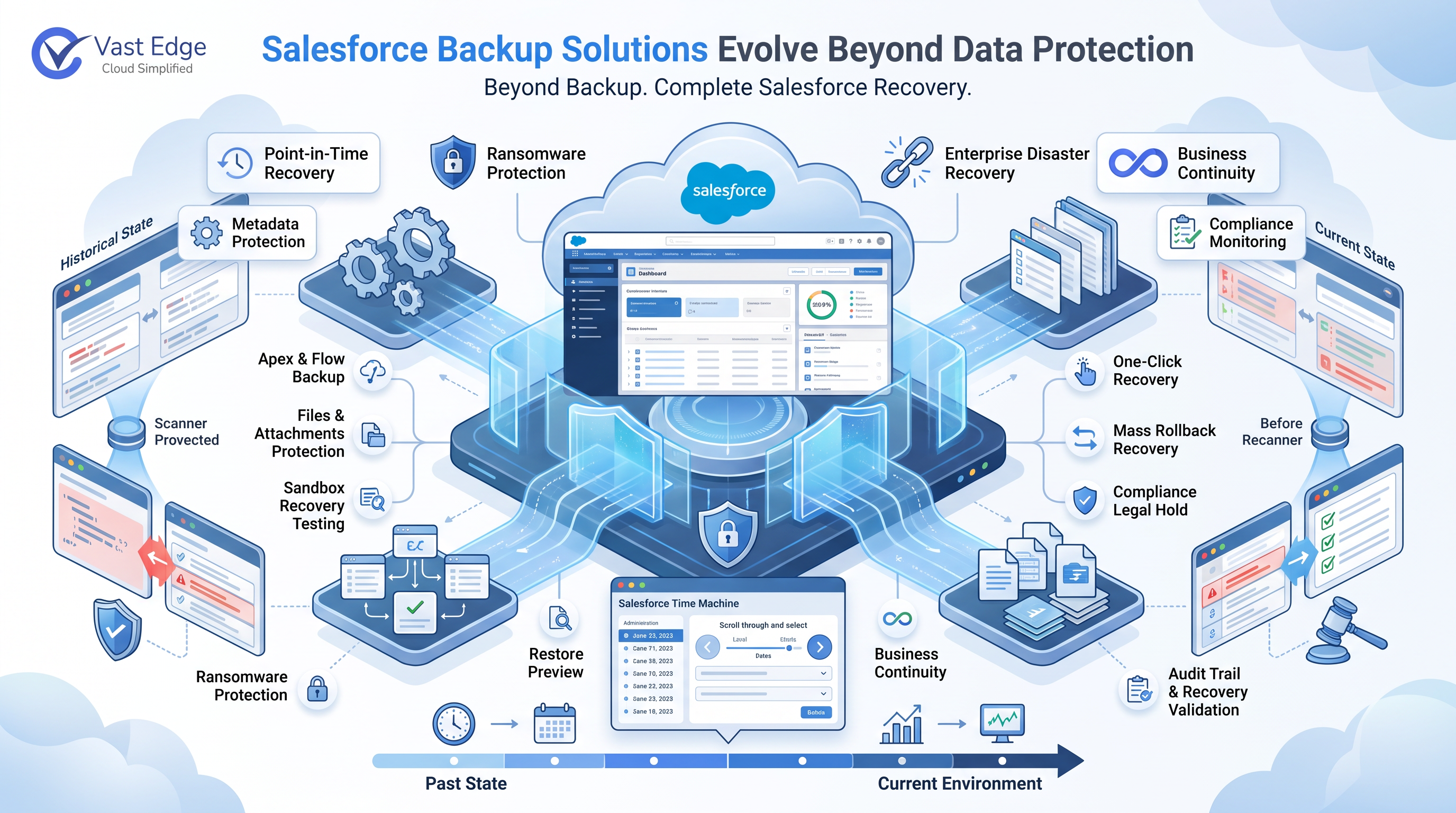

Salesforce backup platforms extend beyond record protection to point-in-time recovery, metadata protection, historical visibility, and recovery validation.
SUNNYVALE, CA, UNITED STATES, August 19, 2026 /EINPresswire.com/ — As Salesforce environments become more customized and connected to critical business systems, organizations are evaluating Salesforce backup solutions based on more than whether a backup copy exists. Data recovery, metadata protection, historical visibility, file protection, and tested recovery procedures are becoming important parts of a complete Salesforce data backup and recovery strategy.
Traditional exports can provide copies of Salesforce records, but recovery requirements are often more complex. Organizations evaluating their backup approach can refer to a Salesforce backup guide to understand backup coverage, recovery requirements, and the differences between native and third-party protection. Accidental deletions, incorrect mass updates, failed integrations, configuration changes, and malicious activit
Why Salesforce Backup Is Becoming More Than Data Protection
A complete Salesforce backup should protect the information required to restore business operations, not just individual records.
Salesforce environments can contain standard and custom objects, files, attachments, Apex code, Flows, validation rules, permission sets, custom fields, page layouts, and other metadata. A data-only backup may recover a deleted record while leaving the configuration that controls how that record operates unchanged.
Salesforce metadata backup is particularly important for organizations with heavily customized environments. Metadata defines how Salesforce processes data, enforces business rules, controls access, and automates workflows. Losing or incorrectly changing that configuration can disrupt business operations even when the underlying records remain available.
What to Look for in Salesforce Backup Solutions
Modern Salesforce backup software should provide several capabilities beyond scheduled data copies:
– Point-in-time recovery: View and recover Salesforce data from historical backup states instead of relying only on the latest copy.
– Data and metadata protection: Protect records alongside Apex, Flows, validation rules, permissions, custom fields, and other configuration.
– Granular recovery: Restore specific records or selected data without unnecessarily rolling back an entire environment.
– Restore preview: Compare backup data with the current Salesforce state before executing a recovery.
– Sandbox recovery testing: Validate restoration procedures in a non-production environment before making changes to production.
– Mass recovery: Support large-scale restoration following mass deletion, failed integrations, incorrect data loads, or significant corruption.
– Files and attachments: Protect contracts, PDFs, images, and other documents associated with Salesforce records.
– Retention and legal hold: Preserve historical backup points required for compliance, audits, or legal matters.
– Audit history: Maintain records of backup access, downloads, and restoration activity.
These capabilities help organizations move from simply maintaining backups to establishing a more reliable Salesforce recovery process.
How Vast Edge Approaches Salesforce Backup and Recovery
Vast Edge combines historical visibility, data protection, metadata backup, and recovery capabilities within its Salesforce Backup platform.
The platform’s Salesforce Time Machine allows administrators to select a historical date and view Salesforce data as it existed at that point. Historical data can be compared with the current environment before recovery decisions are made.
The platform also supports one-click recovery for deleted or corrupted records, historical CSV exports, and side-by-side restore previews. This allows administrators to review changes before applying them to production.
For Salesforce metadata backup, Vast Edge protects and versions components such as Apex code, Flows, validation rules, and permissions. This provides visibility into configuration changes and helps organizations investigate issues involving Salesforce business logic.
Recovery can also be tested in a Salesforce Sandbox before production restoration. For larger incidents, mass rollback capabilities support recovery from events such as failed integrations, incorrect bulk updates, and widespread data corruption.
Files and documents are included alongside Salesforce records, while Compliance Legal Hold allows selected backup points to be preserved beyond normal retention cleanup. A live backup health score provides an overview of backup freshness and protection status, and a tamper-proof audit history records backup-related activity.
Salesforce Backup and Recovery Best Practices
Organizations evaluating Salesforce backup and recovery best practices should consider several areas:
– Back up both data and metadata. Records alone may not be sufficient to restore a customized Salesforce environment.
– Maintain historical recovery points. Problems are not always discovered immediately. Historical backups provide recovery options when an issue is identified days or weeks later.
– Test recovery before an incident. Sandbox testing can reveal restoration issues before production data is affected.
– Review changes before restoration. Comparing backup and production states helps administrators understand what will change before recovery is executed.
– Protect files and sensitive backup data. Backup copies can contain the same sensitive business information as the production environment and should be protected accordingly.
Salesforce Backup and Disaster Recovery
Salesforce disaster recovery is broader than backup. Backup provides independent copies of data, metadata, and files that can be recovered after a data loss event. Disaster recovery encompasses the wider policies, procedures, testing, recovery objectives, and dependencies required to restore business operations.
For small organizations, choosing the best disaster recovery solution for small business often means balancing recovery capabilities, ease of management, security, and cost. Salesforce may be central to sales, customer service, and operations even when the organization does not have a large dedicated IT team.
For larger organizations, evaluating companies that provide disaster recovery solutions requires a broader assessment of recovery objectives, data protection, compliance, testing, integrations, and the ability to restore critical applications and data.
For organizations that depend heavily on Salesforce, backup is an important component of a broader business continuity strategy. The ability to identify a clean recovery point and restore it safely can be critical after a major data or configuration incident.
When Should Organizations Consider Salesforce Backup Software?
Dedicated Salesforce backup software becomes particularly valuable when Salesforce contains critical business information, extensive customization, multiple integrations, or regulatory requirements.
Common situations include accidental deletion, incorrect mass updates, failed integrations, deployment mistakes, data corruption, malicious deletion, and compliance-driven retention requirements.
The key question is no longer simply whether Salesforce data has been backed up. Organizations also need to know what was backed up, how far back they can recover, whether metadata and files are protected, and whether the recovery process has been tested.
Frequently Asked Questions
What is Salesforce backup?
Salesforce backup is the process of creating independent copies of Salesforce data, files, and configuration that can be used for recovery after data loss or corruption. A complete strategy can include records, custom objects, files, attachments, and Salesforce metadata.
What should a Salesforce backup include?
A complete Salesforce backup should protect standard and custom records, files and attachments, and important metadata such as Apex, Flows, validation rules, permissions, custom fields, and page layouts. The exact scope should depend on the organization’s recovery and compliance requirements.
Why is Salesforce metadata backup important?
Salesforce metadata defines how the environment operates, including business logic, automation, data validation, and user permissions. Salesforce metadata backup preserves historical configuration states so organizations can investigate and recover from configuration changes that affect business operations.
Can I restore specific Salesforce metadata after a backup?
Yes, when the backup solution captures and versions the relevant metadata. Depending on the component and recovery method, administrators can identify a previous version of a configuration component and restore or redeploy it without necessarily restoring unrelated Salesforce data.
What is the difference between Salesforce backup and disaster recovery?
Salesforce backup provides recoverable copies of data, metadata, and files. Salesforce disaster recovery is broader and includes recovery procedures, testing, recovery objectives, dependencies, and business continuity planning. Backup is an important part of a complete disaster recovery strategy.
About Vast Edge
Founded in 2004 by former KPMG technology professionals, Vast Edge provides enterprise cloud solutions, backup and disaster recovery, managed cloud infrastructure, AI-powered business applications, analytics, and enterprise security. Its data protection portfolio includes dedicated backup and recovery platforms for Salesforce, NetSuite, Workday, Jira Cloud, Microsoft 365, and Google Workspace, along with cloud, ERP, and enterprise technology services.
Vik Mehta
Vast Edge
+1 408-386-6386
vik@vastedge.com
Visit us on social media:
LinkedIn
Facebook
YouTube
X
Legal Disclaimer:
EIN Presswire provides this news content “as is” without warranty of any kind. We do not accept any responsibility or liability
for the accuracy, content, images, videos, licenses, completeness, legality, or reliability of the information contained in this
article. If you have any complaints or copyright issues related to this article, kindly contact the author above.

Media gallery